#Samsung #OneUI9 #Bixby #GalaxyAI #AIPhone #SamsungGalaxy #Android #CongNghe #TinCongNghe #OneUI
Would you accept the phone always "seeing" your face to activate AI immediately if the exchange was faster response speed and a sci-fi movie-like experience?
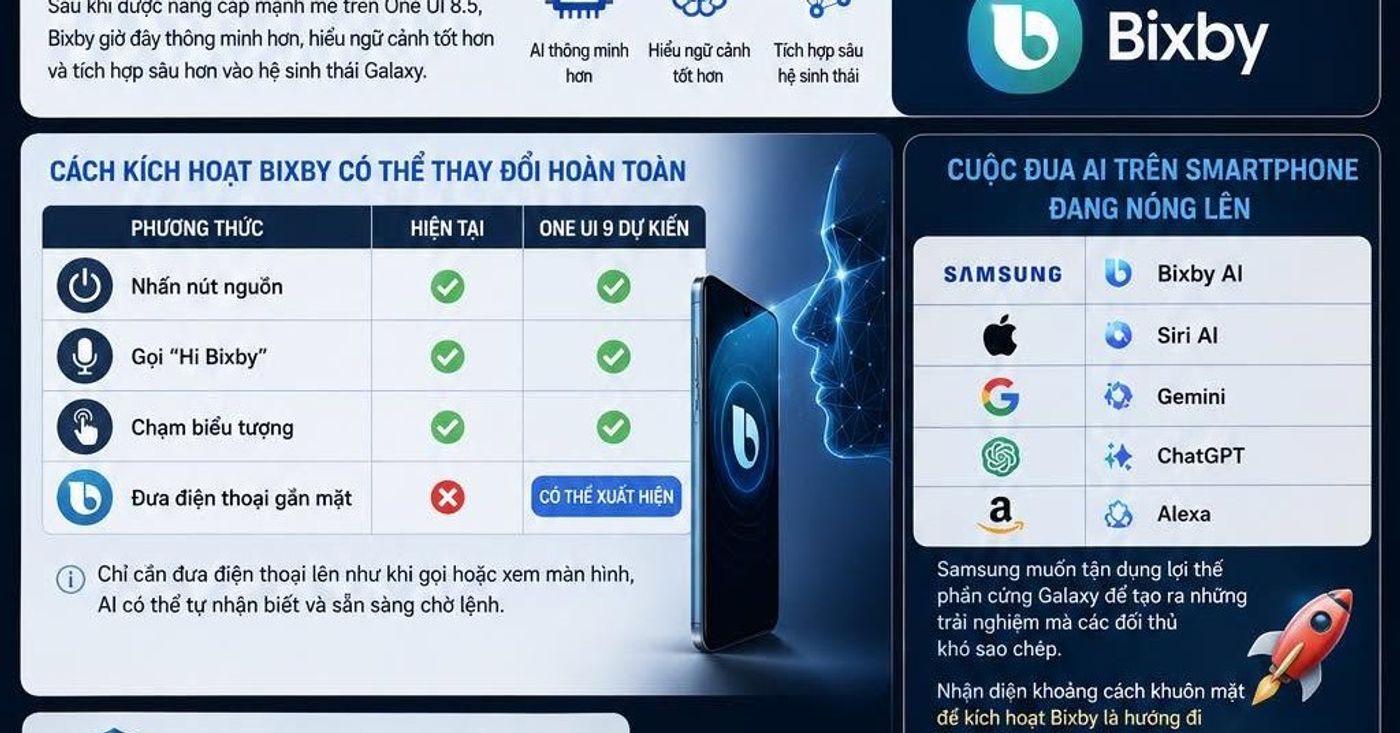
Samsung is said to be testing a completely new way to activate Bixby on One UI 9. Instead of holding down the power button, calling by voice or touching the virtual assistant icon, users can simply bring the phone close to their face for Bixby to automatically appear.
This information appeared not long after Samsung strongly upgraded Bixby on One UI 8.5 with smarter AI capabilities, better contextual understanding and deeper integration into the Galaxy ecosystem.
If this feature officially appears on One UI 9, this could be one of Samsung's biggest changes to the way people interact with phones in years.
Bixby Is Changing From a Voice Assistant to a Context AI Assistant
For many years, Bixby has always been weighed against competitors such as
AI Assistant Developer
Bixby Samsung
Siri Apple Inc.
Gemini Google
ChatGPT OpenAI
Alexa Amazon
In the past, Bixby was often considered slow, unnatural and not smart enough to compete with Siri or Google Assistant.
However, everything began to change when SamAdding Galaxy AI to the Galaxy ecosystem and rebuilding Bixby based on large AI language models.
The new goal is no longer simply to receive voice commands but to understand users, predict needs and respond in context.
How to Activate Bixby Can Change Completely
Method Current One UI 9 expected
Press the power button Yes Yes
Call “Hi Bixby” Yes Yes
Tap the “Yes” icon
Hold the phone close to your face No May appear
If Samsung successfully implements it, this will be one of the most natural AI-enabled systems on Android smartphones.
Users just need to raise their phone as if preparing to make a call or look at the screen, the AI can recognize itself and be ready to wait for commands.
The AI Race on Smartphones is Heating Up
Samsung currently has to compete directly with many big names.
AI Assistant Firm
Samsung Bixby AI
Apple Siri AI
Google Gemini
OpenAI ChatGPT
Amazon Alexa
Apple just announced many improvements to Siri AI in the new iOS.
Google is integrating Gemini into nearly every Android device.
Meanwhile, Samsung wants to take advantage of Galaxy hardware to create experiences that are difficult for competitors to copy.
The face distance recognition feature to activate Bixby is a typical example of this direction.
Security Issue Will Be a Big Question
Although the idea sounds very appealing, it also raises many concerns.
Users can ask questions
• Whether the camera is always active or not
• Where is facial data processed?
• Whether AI is accidentally activated in public environments
• Damaged photoHow about battery life?
Samsung will need to address these issues if it wants the feature to be widely adopted by the community.
What Will Happen If This Feature Is Successful
If holding your phone close to your face can actually activate AI quickly and accurately, the future of smartphones could change in a less touch-oriented direction.
Users won't need to find buttons, won't need to call voice assistants, and won't need to open apps.
Everything can happen almost instantly with just one natural action.
That is also the goal that major technology companies are pursuing in the era of personal AI.
Quick Summary
Content Information
One UI 9 version
New feature Activate Bixby by holding the phone close to your face
Galaxy AI Platform
Benefits Access AI faster
Challenge Privacy and battery
Competitors Siri AI, Gemini, ChatGPT, Alexa
Samsung is gradually transforming Bixby from a traditional voice assistant into the AI center of the entire Galaxy ecosystem. If One UI 9 really brings the ability to activate using facial distance recognition, this could be a notable step forward in the AI race on smartphones in the 2026–2027 period.
#SamsungGalaxy #GalaxyAI #Bixby #OneUI9 #AI #Android #Smartphone #CongNghe #TinCongNghe #GalaxyS26 #Samsung #TechNews #ArtificialIntelligence #MobileTechnology