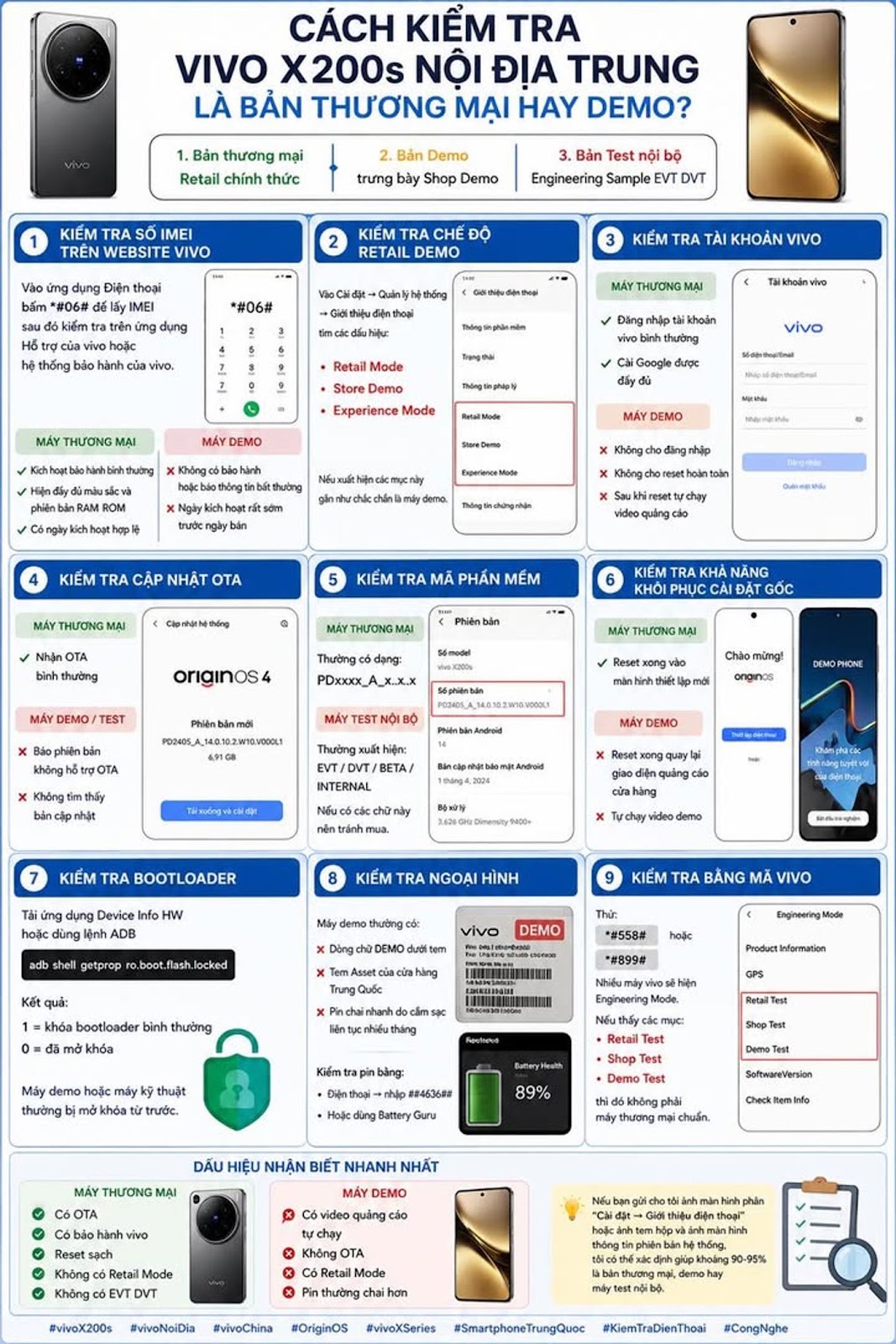
Currently, there are 3 types of devices available in China's domestic Vivo X200s
1. Official Retail commercial version
2. Demo version displays Shop Demo
3. Internal Test Engineering Sample EVT DVT
1. Check the IMEI number on the vivo website
Go to the Phone app
Click
*#06#
Get the IMEI and check it in vivo Support app or vivo warranty system.
Commercial machines are often available
✅ Activate normal warranty
✅ Show full color and RAM ROM version
✅ Has a valid activation date
Regular demo machine
❌ No warranty or unusual information reported
❌ Activation date is very early before the sale date
2. Check out Retail Demo mode
Enter
Settings → System Management → About phone
Look for the signs
❌ Retail Mode
❌ Store Demo
❌ Experience Mode
If these items appear, they are almost certainly demo machines.
3. Check your vivo account
Commercial machine
✅ Log in to your vivo account normally
✅ Install Google fully
Multi-machine demo machine
❌ Not allowed to log in
❌ Do not allow complete reset
❌ After reset, the advertising video will automatically run
4. Check for OTA updates
Enter
Settings → System Update
Commercial machine
✅ Receive OTA normally
Demo or test machine
❌ Report version that does not support OTA
❌ No update found
5. Check the software code
Enter
About phone → Version
Commercial machines usually come in the form of
PDxxxx_A_x.x.x
Internal testing machines often appear
EVT
DVT
BETA
INTERNAL
If these words are present, avoid buying.
6. Check the ability to restore installationset root
Commercial machine
✅ After reset, enter the new setup screen
Demo machine
❌ After reset, return to the store advertising interface
❌ Run the demo video yourself
7. Check the bootloader
Download the Device Info HW application
Or use ADB command
adb shell getprop ro.boot.flash.locked
Results
1 = normal bootloader lock
0 = unlocked
Demo or technical machines are often unlocked in advance.
8. Check appearance
Demo machines are often available
❌ The words DEMO are below the stamp
❌ Asset stamp from Chinese store
❌ Battery drains quickly due to continuous charging for many months
Check the battery with
Phone → enter
##4636##
or use
Battery Guru
9. Check with vivo code
Try it
*#558#
or
*#899#
Many vivo devices will display Engineering Mode.
If you see items
Retail Test
Shop Test
Demo Test
then it is not a standard commercial machine.
The fastest recognizable sign
Commercial machine
✅ OTA available
✅ Has vivo warranty
✅ Clean reset
✅ No Retail Mode
✅ No EVT DVT
Demo machine
❌ There are advertising videos that run automatically
❌ No OTA
❌ Has Retail Mode
❌ Batteries are often more worn out
If you send me a screenshot of the section
“Settings → About phone”
or box stamp image and system version information screen image, I can help determine about 90-95% whether it is a commercial version, demo or internal test machine.
#vivoX200s #vivoNoiDia #vivoChina #OriginOS #vivoXSeries #SmartphoneChina #KiemTraDienThoai #QueenMobile #CongNghe #ReviewDienThoai What's the Difference Between Demo and Commercial? Is a used demo machine something to worry about?
Many people think demo machines are just different from the box, butIn fact, there are cases where demo machines are almost identical to retail machines, and there are also cases where they should be avoided completely.
1. Difference between commercial machine and demo machine
Demo Trading Criteria
Purpose: Selling to customers for display
Full accessories box May be missing
OTA update Normal May be limited
Company Warranty Yes or No?
Operating time Few Very many
New Batteries Wear More
New Screen Displayed continuously
Higher Price Cheaper
2. The most worrying thing is the screen
For vivo X200s uses AMOLED screen.
Regular demo machine:
✅ Lights up continuously 10-12 hours/day
✅ Showing the same image for months
Risk:
❌ Save photos lightly
❌ Burn-in screen
❌ Dark color in status bar
You should open the white background full screen to check.
3. The battery is the most affected part
Demo machines at regular stores:
✅ Plug in and charge continuously 24/7
✅ Works at high temperatures
After 6-12 months on display:
* Battery may be 85-95% remaining
* Some machines are even lower
This is the factor that has the biggest impact on long-term experience.
4. Will the life of the mainboard and chip be reduced?
Usually insignificant.
Chips like the MediaTek Dimensity 9400+ or UFS memory don't wear out much just from demo runs.
If the machine has never been repaired:
✅ Performance almost as good as commercial machines
✅ Does not reduce processing speed significantly
5. Is the camera affected?
Rarely.
However, you should check:
*Auto focus
* OIS anti-shake
* Selfie camera
* Camera zoom
Because many customers have tried it thousands of times.
6. What types of demos should be avoided?
Genuine Retail Demo
This is the problemi might consider if the price is good.
Demo converted to commercial
This is the type to be careful with.
Signs:
❌ Lost OTA
❌ Unlock bootloader
❌ ROM editing
❌ Not receiving updates
7. What if the machine is used?
Used commercial machines are often better than demo machines of the same age.
For example:
Commercial machines 99%
* Battery 95-100%
* Personal use
* Fewer screen-on hours
Demo machine 99%
* Beautiful appearance
* But the screen and battery work a lot harder
Therefore, most domestic machine players will prioritize:
Used commercial machines > Demo machines
8. Should I buy vivo X200s demo?
You can buy it if:
✅ Price is significantly cheaper
✅ OTA works normally
✅ No screen burn-in
✅ Battery remaining over 90%
✅ Not a modified ROM
You should not buy if:
❌ The price difference is only a few hundred thousand to 1 million VND compared to commercial machines
❌ Does not accept OTA
❌ Battery below 85%
❌ There are signs of saving screen images
With vivo
#vivoX200s #vivoNoiDia #OriginOS #vivoChina #SmartphoneNoiDia #DienThoaiCu #CongNghe #QueenMobile